Device Actions: Examples of 2-Step API Calls with Asynchronous Resolution
2-Step Action! Set Credentials and Schedules!
Step 1a: Get Upload URL (Request #21)
The Upload URL is the endpoint developers will use to update a device’s complete credentials and schedules “database”.
The Upload URL - obtain from the response to this request - will be automatically populated by a script that we’ll use in the second step of this call to upload our credentials and schedules JSON Payload.

Step 1b: Get Status of Action ID (Request #22)
We’re pausing here to observe the state of our action request before we initiate the second step of this request. Here we are looking up the Action by the Action ID.
Notice the status of the action is “AWAITING_DATA”
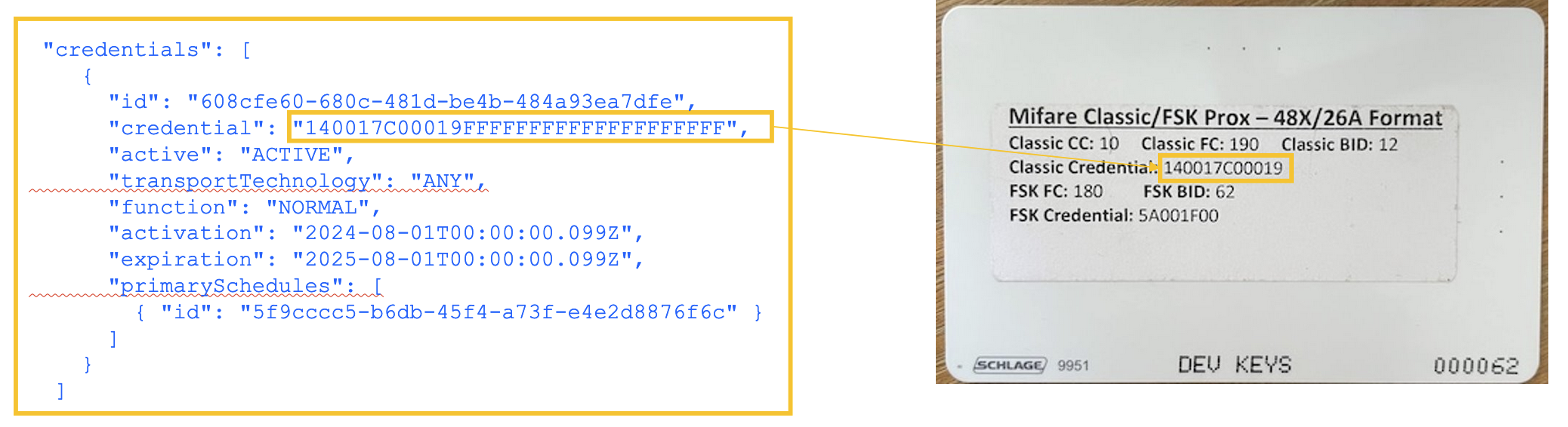
Sidequest: Getting a Credential ID
Observe that the JSON definition for the credential MUST adhere to the following rules:
- Must be in All CAPS and Hexadecimal
- Must be 32 characters
- Must be appended by a series of Fs for empty characters
Step 2 : Upload Credential Data (JSON) (Request #23)
This is the second step of the 2-step process we initiated with request #21 to obtain an Upload URL
In this step we use a PUT to upload a JSON payload (the body of this request) to the URL we obtained in Step 1. We’ll receive a 200 status response with an empty status response. The 200 indicates that our request was successfully sent, but it does not mean it was successfully processed.
We will wait about 2 minutes and then, once again, query the status of our request (same as the previous call we just made) to observe the acknowledgement of the change in state.

Step 2 (completed): Get Status of Action ID once again (Request #24)
After letting the request process, we see the action request was successfully resolved. Notice the status of the action is “RESOLVED”.
If you get a status of “REJECTED”, obviously something when wrong. Check the JSON payload for malformed JSON. If you make this request too early, you’ll only see a record with status of “PENDING”, so be patient if that’s what you see, then send the request again.
Note: We actually received 2 DEVICE_ACTION_UPDATED requests returned – one for the action when it change from AWAITING_DATA to PENDING and another when it changed from PENDING to RESOLVED.

Good Measure! Get Credentials & Schedules Once Again (Request #25)

This request is a duplicate of #20, used to GET the credentials and schedules as established by the device. This confirms that the credential was successfully applied to the device.
On this page
- Device Actions: Examples of 2-Step API Calls with Asynchronous Resolution