YP No Tour overview
What is No Tour?
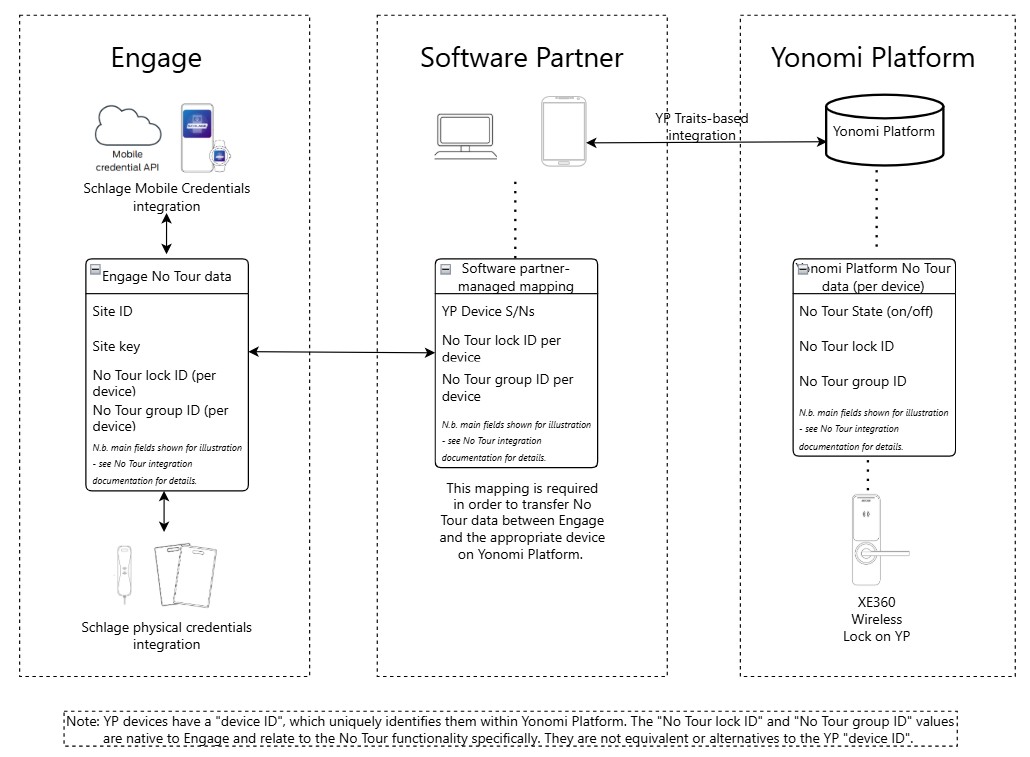
The No Tour functionality allows property owners and administrators to assign and change access rights without having to physically visit the lock (which is not connected to WiFi) to make access programming updates. This is done by loading credential data on a physical or mobile credential (NFC or BLE). When the credential is next used at the relevant lock, the No Tour data are transferred to the lock’s database. No Tour functionality is currently available for Allegion locks with an Engage integration (see this diagram for an illustration).
No Tour for Yonomi Platform devices
Certain devices on Yonomi Platform (YP), such as the XE360 Wireless Lock, offer No Tour functionality for when the device is operating in a setting where it is not connected to WiFi. YP support for No Tour aims to enable software partners to offer the ability to manage and interact with No Tour on Engage and YP devices with minimal differences in end-user (e.g. patron and building admin) experience regardless of the platform on which the lock is hosted. This is particularly important for situations where a building may have both Engage and YP devices requiring No Tour functionality.
Necessary integration points
To ensure consistency of experience with Engage No Tour, YP No Tour support requires integrations with elements of Engage and YP. The constituent parts are an/a:
- Engage integration via API* to create and manage the relevant Engage site IDs and keys and other Engage-specific No Tour-related data fields (such as lock ID and group ID);
- Engage integration via API* for the MT20W enrollment reader to add No Tour data to the physical credentials and/or Schlage Mobile Credential integration for mobile credentials (see Mobile No-Tour) (Note: YP does not differentiate between different types of mobile credentials);
- YP integration to enable No Tour for relevant devices and to create and manage No Tour lock configuration; and a
- mapping, maintained by the software partner independently of Engage and YP, of device-level No Tour information with YP identifiers, so that the correct Engage-based No Tour information is passed to a YP-hosted device.
*Use of the Engage Web App to manage No Tour does not surface the data that needs to be mapped between Engage and YP.
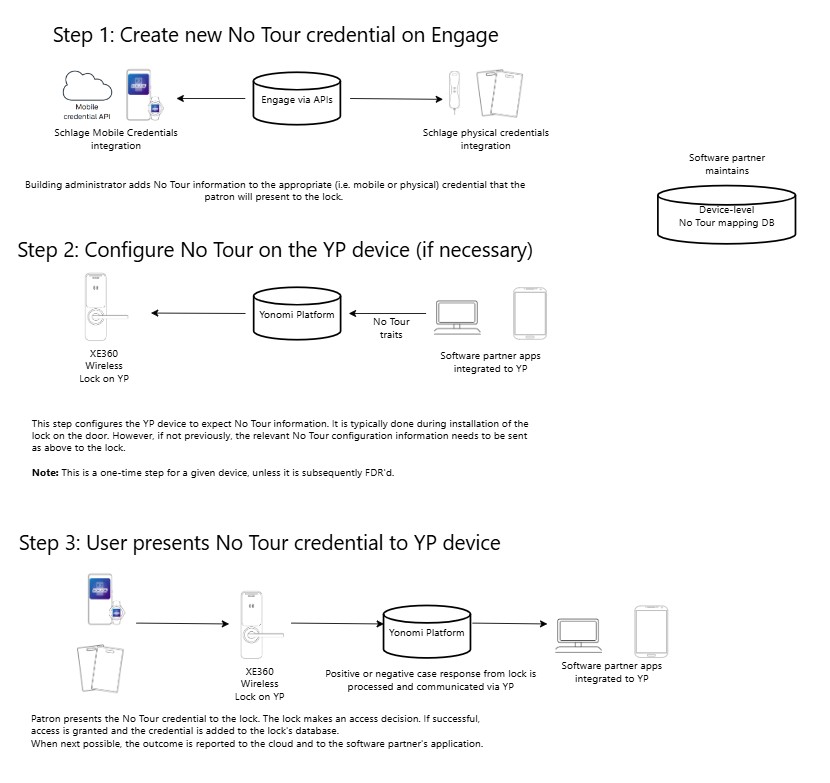
Example of No Tour user workflow
As illustrated below, the Engage integration is necessary to add No Tour information on the credentials. When a No Tour credential is presented to a lock, the response is tracked and communicated to the software partner applications via YP at the next synchronisation opportunity.
Note: Configuring the YP device (Step 2 in the diagram) to expect No Tour information is typically done during the lock’s installation on a door. This step provides it with the required information for it to make access control decisions for No Tour credentials.
On this page
- YP No Tour overview