Device Ownership Management
Claiming Device Ownership
Prerequisites
- PAC client software must have an application that connects directly to device via Bluetooth using the Yonomi Mobile SDK. Application must have feature to request claim token generation.
- User must have a valid Yonomi installation which they desire to own the device.
- User must have a valid Yonomi-capable device that is in claimable state (see below section for details).
Note: See the Getting Started training guide Training: Preparation for Claiming a Device for assistance in meeting these pre-requisite requirements.
Getting Device in Claimable State
Device is new from factory
- Device should already be in a claimable state. Note: If claiming operation results in error saying the device can't be claimed, contact device maker's customer support team for assistance.
Device is pre-owned
- The previous installation must have already unclaimed the device. Note: If the device has not been unclaimed yet and the new device owner has no way to unclaim it from the previous installation, contact device maker's customer support team for assistance.
- The device must have successfully been Factory Default Reset AFTER having been unclaimed. Note: See device maker documentation on how initiate the Factory Default Reset process from the device itself.
Claiming ownership of a device
Flow Diagram
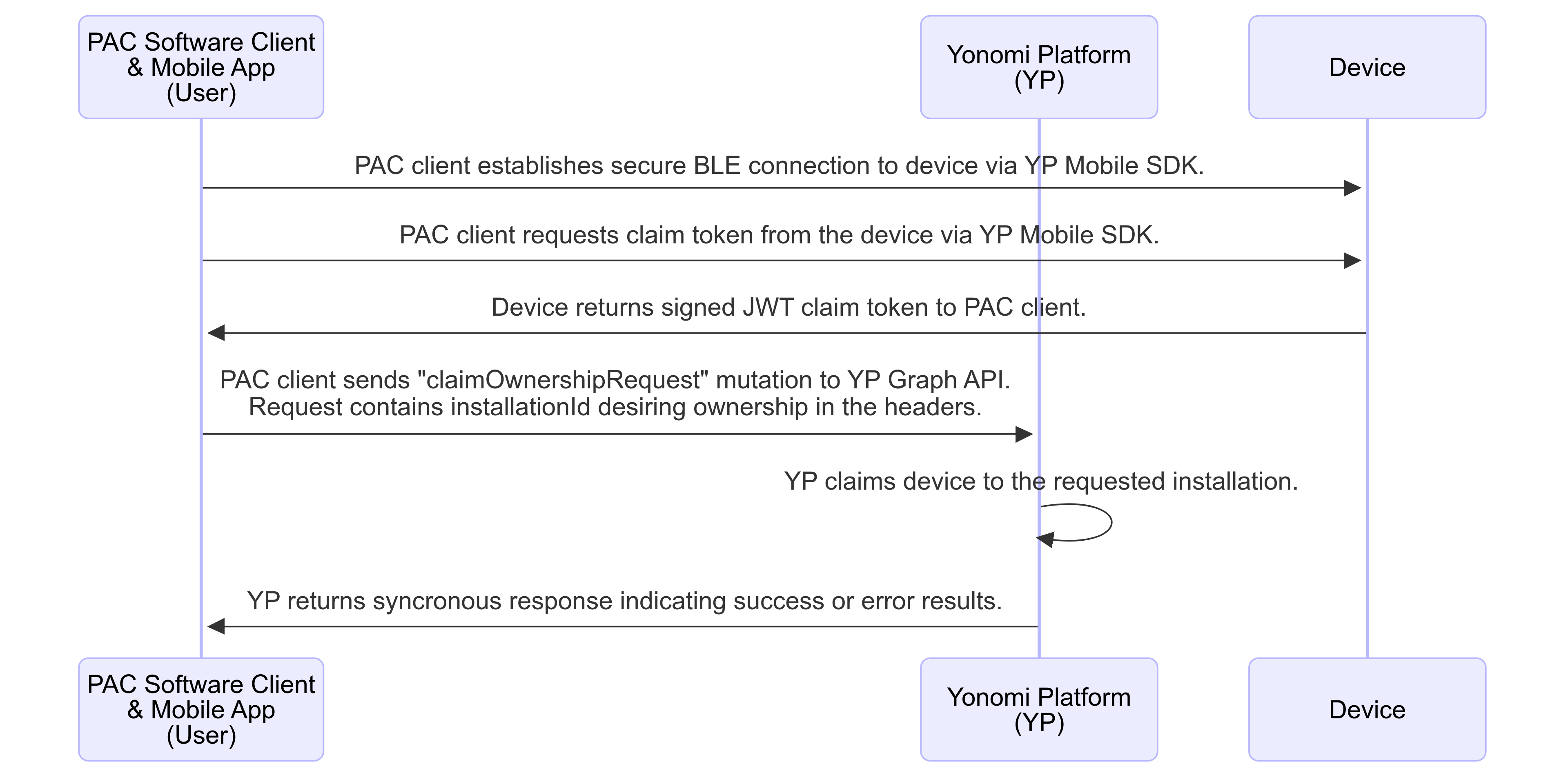
ClaimOwnershipRequest GraphQL Mutation
Claims device to the requested installationId.
Request Headers
Field Name | Description | DataType | Required |
x-allegion-installation-Id | UUID of the installation that user wants device claimed to. | ID! | true |
GraphQL Request Body
 mutation ClaimOwnershipRequest {
    claimOwnershipRequest(claimToken: $DeviceJWTString!) {
        deviceId
        owner {
            installationId
        }
    }
}
Input Name | Description | DataType | Required |
claimToken | The claim token JWT received from the device using the mobile app's bluetooth connection. | String! | true |
Possible Claiming Error Responses
Error Code | Description |
DEVICE_RESET_REQUIRED | If you receive this code, the claimToken JWT provided is correct and the device is availble to be claimed, but the device is not in Factory Default state. FDR the device (see device maker's documentation) and then retry claiming it. |
CANNOT_CLAIM | If you recieve this code, it means there was an error with the claim process itself such as the claimToken JWT being malformed or invalid, the deviceId in the claimToken JWT not being a valid deviceId, or the deviceId in the claimToken JWT has already been claimed. It is recommended to request a new claimToken from the device and retry claiming, then if the issue recurs contact the device maker customer support team for assistance. |
Query Owned Devices
MyOwnedDevices GraphQL Query
Gets a list of deviceIds that are owned by the target installation.
Request Headers
Field Name | Description | DataType | Required |
x-allegion-installation-Id | UUID of the installation that device is currently claimed to. | ID! | true |
Request Body
 mutation MyOwnedDevices {
    myOwnedDevices
}
This query has no inputs other than the required header. It will return a list of deviceIds that are currently owned by the installationId included in the header.
Relinquishing Device Ownership
Relinquishes ownership of the device from current owner and puts the device back in a claimable state so that another installation may take over ownership of the device.
Step 1: UnclaimOwnershipRequest GraphQL Mutation
Unclaims device from the current owner installationId.
Request Headers
Field Name | Description | DataType | Required |
x-allegion-installation-Id | UUID of the installation that device is currently claimed to. | ID! | true |
Request Body
mutation UnclaimOwnershipRequest {
unclaimOwnershipRequest(deviceId: 9a8f6104-6c50-476e-90ee-16b9a2dafc8d) {
deviceId
}
}Input Name | Description | DataType | Required |
deviceId | uuid of the target device. | ID! | true |
Step 2: Reset device to Factory Settings
Follow device maker documentation to reset the device to factory default state.
Note: New device owners will not be able to claim ownership until the device is in factory default state in order to protect previous owners' sensitive data stored on the device from being readable to a new owner.
On this page
- Device Ownership Management