Device Action Lifecycle
Introduction to Trait Actions
A trait action is an interaction that is taken from the cloud to update the device or initiate a command in the device current state. Examples include updating device setting values, writing authorized credential data to the device, issuing a remote unlock command, or iniitating device firmware update.
Trait Action Lifecycle Flows
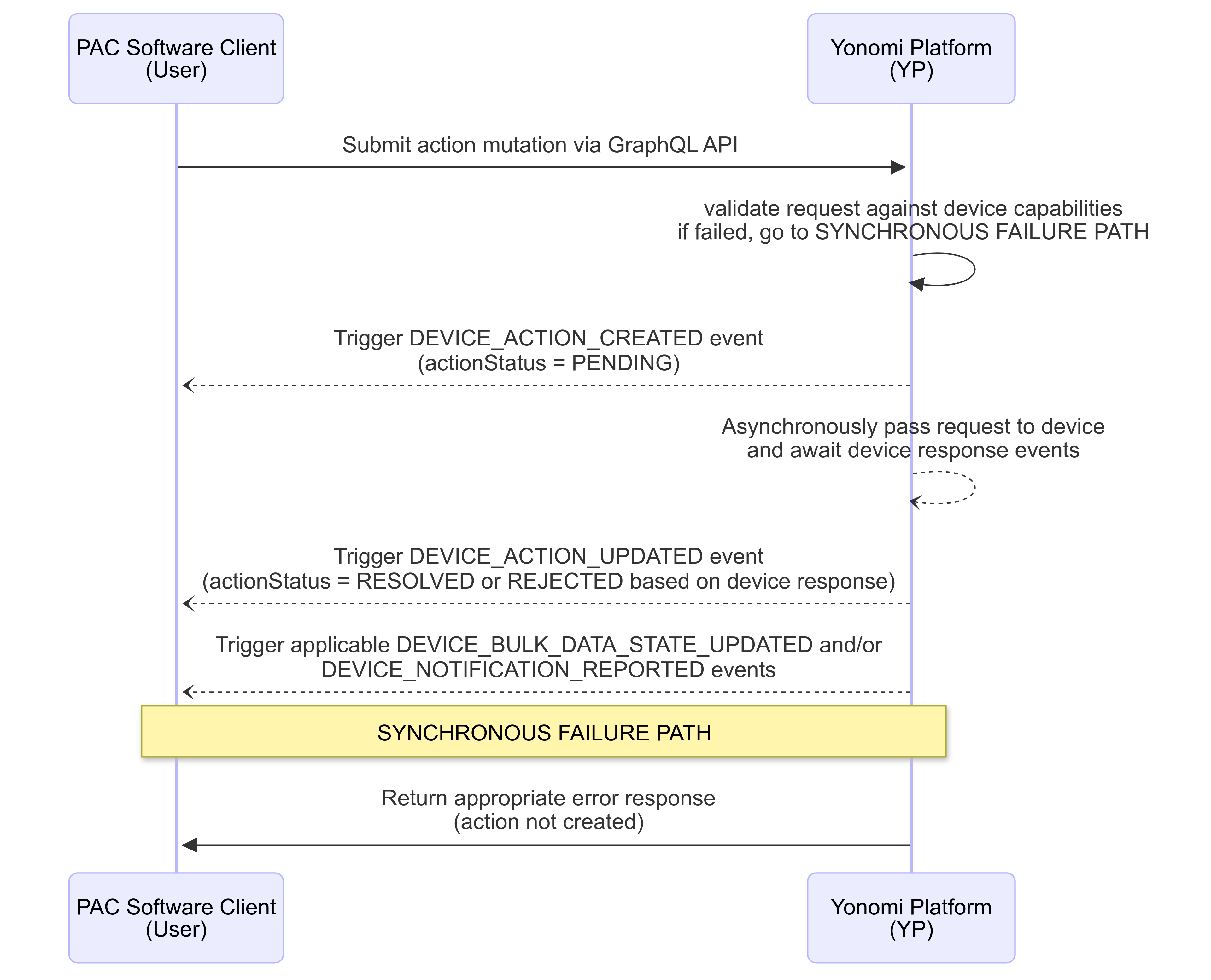
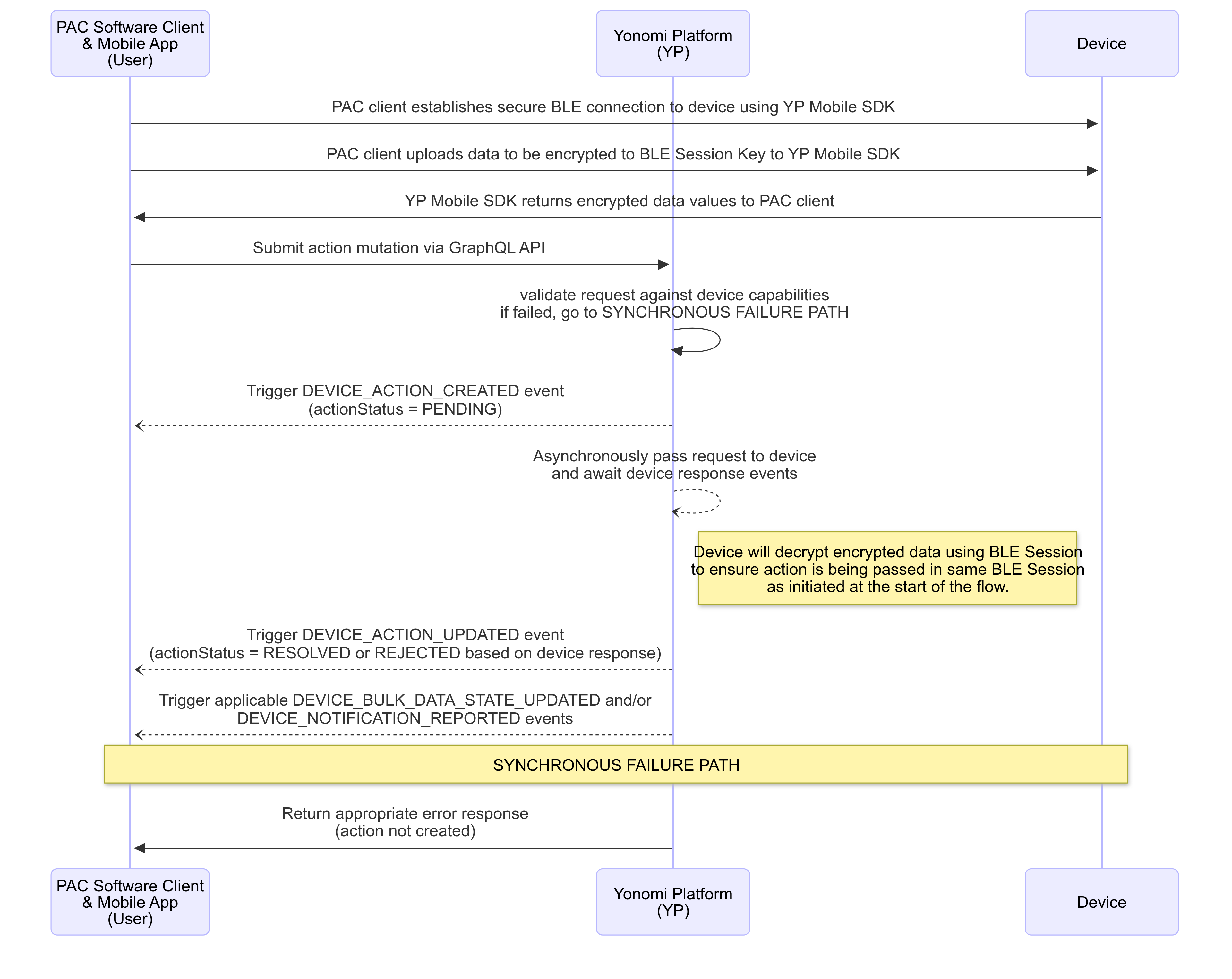
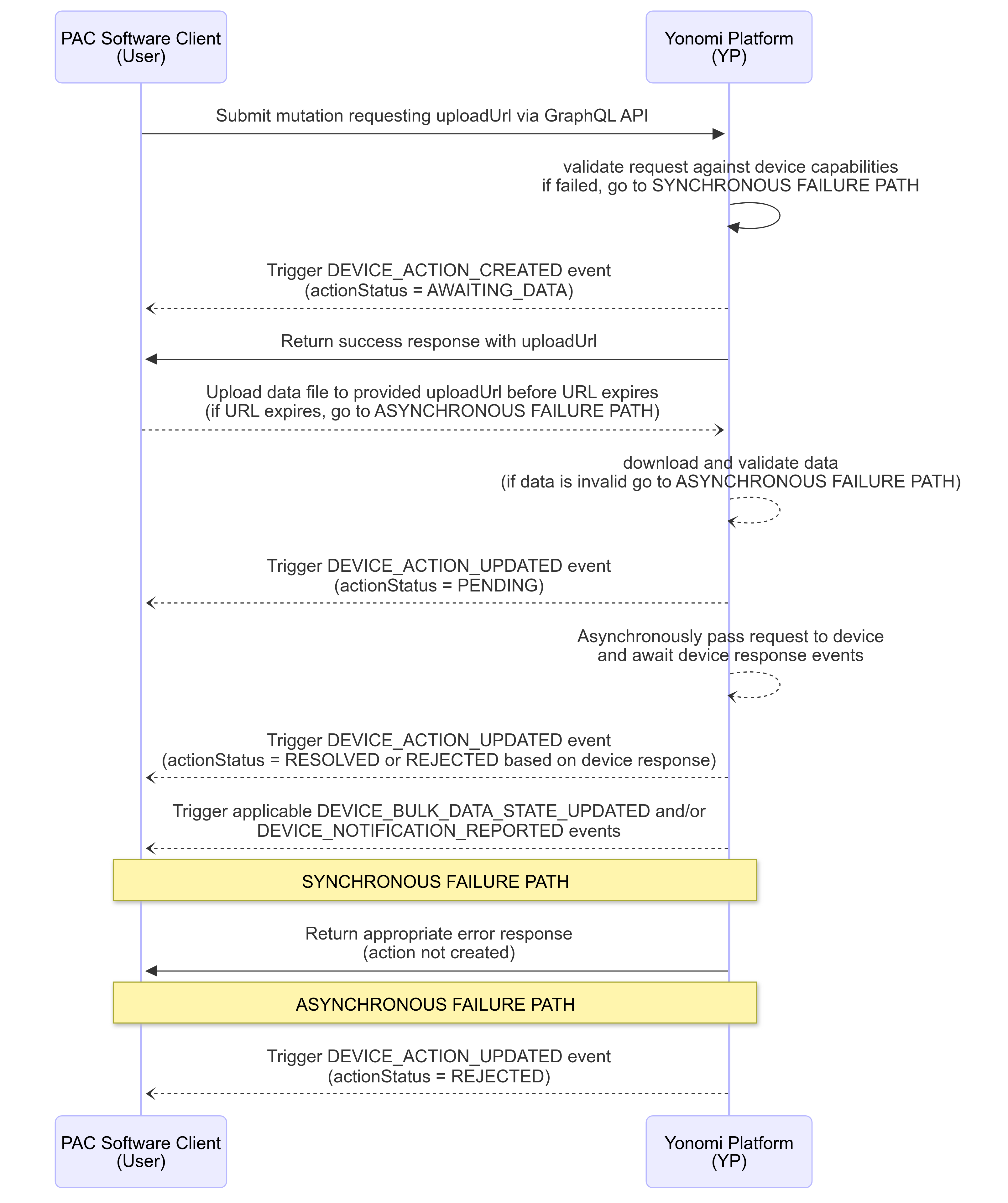
The interaction flow throughout the trait action lifecycle varies depending on whether the trait is a standard, or bulk data type trait (See individual trait documentation). Additionally, a standard trait flow may have specific action requests that are “BLE Only Commands” which require additionally processes of connecting to the device via BLE before triggering the command. - Where applicable, individual trait action documentation explicitly calls out that the action requires the “BLE Only Command" flow. Regardless, the action lifecycle consists of 2 parts: the originating synchronous requests made to Yonomi APIs and an asynchronous flow where Yonomi and device communicate and update the action status through published events.
Standard Action Lifecycle Flow
Standard Action Lifecycle Flow for BLE Only Command Actions
Bulk Data Action Lifecycle Flow
Submitting Action Requests
To initiate an action, the user must submit a GraphQL mutation to the Yonomi Platform. Each action mutation is defined in the individual trait documentation, so refer to those pages for mutation request definitions.
Required Headers
All trait mutations require the following header be included regardless of which trait / action mutation it is.
FieldName | Description | Value | Required |
x-allegion-installation-Id | UUID of the installation that owns the device. Authentication will validate that bearer token has authorization to mutate against this installationId and that the requested deviceId is owned by that installation. If either fail, request will be rejected. | ID! | true |
Success Response
Once request has been submitted and passes validation in Yonomi Platform, an action is created along with an actionId that will be used to correlate any asynchronous events that occur as a result of the action. On successful response, user will get a synchronous response that contains the graphQL response definition submitted with the request this response may contain actionId, deviceId, and/or mutationName.
NOTE: While user may submit requests that omit actionId from the response, doing so will prohibit user from tracking any updates to the action status. As such, it is highly recommended that all requests request at least the actionId be returned on successful response.
Error Response
In case of error with the synchronous request, API will return one of the errors defined here: Trait Overview: Synchronous Request Errors.
Action Lifecycle Events
See Device Events for information on subscribing to webhooks or submitting event queries.
Action Lifecycle Event Shape Examples
DEVICE_ACTION_CREATED Event Example
Event that is published when the action is created.
 {
    "eventType": "DEVICE_ACTION_CREATED",
    "actionId": "7eb3629a-a1c3-49f0-89b6-2831d500ac68",
    "deviceId": "9a8f6104-6c50-476e-90ee-16b9a2dafc8d",
    "installationId": "819cd607-aede-482e-9aa0-8b65d420e300",
    "createdAt": "2024-12-20T14:49:55.000Z",
    "actionName": "AutoRelockDelaySettingsV1SetAutoRelockDelay",
    "actionStatus": "PENDING",
    "actionParameters": {
        "deviceId": "9a8f6104-6c50-476e-90ee-16b9a2dafc8d",
        "traitActionArgs": {
            "autoRelockDelay": 30
        }
    }
}
DEVICE_ACTION_UPDATED Event Example
Event that updates an already created action.
 {
    "eventType": "DEVICE_ACTION_UPDATED",
    "actionId": "7eb3629a-a1c3-49f0-89b6-2831d500ac68",
    "deviceId": "9a8f6104-6c50-476e-90ee-16b9a2dafc8d",
    "installationId": "819cd607-aede-482e-9aa0-8b65d420e300",
    "createdAt": "2024-12-20T14:49:55.000Z",
    "actionStatus": "REJECTED",
    "errors": [
        {
            "code": "ERR_DATA_FILE_VALIDATION_FAILED",
            "message": "The provided data file failed validation and could not be uploaded to the device.",
            "details": {
                "dataFileValidationErrors": [
                    {
                        "code": "ARRAY_EXCEEDS_MAX_ITEMS",
                        "message": "Count of objects included in the array exceed maximum allowed for this device.",
                        "details": {
                            "path": [
                                "credentials",
                                "2000"
                            ],
                            "maxItems": 2000
                        }
                    }
                ]
            }
        }
    ]
}
Action Lifecycle Event Fields
Field Name | Description | Data Type |
eventType | the name of the event | String |
actionId | the uuid assigned to the action request | ID |
deviceId | the uuid of the device to be acted upon | ID |
installationId | the uuid of the installation that has claimed the device being acted upon | ID |
createdAt | ISO8601 format UTC timestamp when event was published to Yonomi event log | DateTime |
actionName | Name of the Action Mutation submitted in the request | String |
actionStatus | Current status of the action request. See table below for values. | actionStatusEnum |
actionParameters | The inputs submitted with the mutation request. See individual trait documentation for mutation inputs | Object |
errors | Array of applicable error objects that caused failure of the action. See below list of errors for more information | eventErrorObjects Array |
actionStatusEnum Values
Value | Description |
AWAITING_DATA | Used on bulk-data trait actions. Action has been created but requires user to upload data file to the provided uploadUrl before action can be communicated to device. |
PENDING | Action has been created. Data has been validated and request has been communicated to device. Pending confirmation from device that request has completed or failed. |
REJECTED | Action is confirmed as having failed. See provided error details for more information. New action request may be submitted, but there is no further process for this action. |
RESOLVED | Action is confirmed as having completed successfully. |
eventErrorObjects
Code | Message | Details |
ERR_ACTION_SUPERSEDED | Superseding action request was received while this action was pending. | --- |
ERR_INTERNAL_SERVER | An unspecified error occurred. | --- |
ERR_INTERNAL_SERVER | An unknown error occurred. | --- |
ERR_DEVICE_RESET | Device was reset while action was pending. | --- |
ERR_ACTION_NOT_SUPPORTED | Device model does not support requested action. | --- |
ERR_ACTION_EXPIRED | Action has expired due to communication timeout with device. Check device connectivity status and try again. | --- |
ERR_DATE_IN_PAST | Requested dateTime value(s) must not be before current device dateTime. | --- |
ERR_FIRMWARE_SCHEDULE_SEQUENCE | Firmware install dateTime must be later than the download dateTime | --- |
ERR_URL_EXPIRED | UploadUrl provided for this action has expired without required data file being uploaded. | --- |
ERR_DATA_FILE_VALIDATION_FAILED | The provided data file failed validation and could not be uploaded to the device. | array(dataFileValidationErrors) |
ERR_SSID_NOT_FOUND | Could not connect to wifi; input SSID could not be found. | --- |
ERR_INVALID_CREDENTIAL | Could not connect to wifi; input incorrect network password | --- |
ERR_TIMEOUT | Process timed out, please retry. If issue continues to occur, contact support. | --- |
ERR_UNSUPPORTED_SECURITY_PROTOCOL | Could not connect to wifi; selected security protocol is not supported. | --- |
ERR_ CONNECTION_FAILURE | Could not connect to wifi; Successfully connected to access point, but could not connect to device cloud IoT Hub. Retry connection, and contact support if issue continues. | --- |
ERR_DEAUTHENTICATION | Could not connect to wifi due to wifi de-authentication. | --- |
ERR_WIFI_DISASSOCIATED | Could not connect to wifi due to wifi disassociation. | --- |
dataFileValidationErrors Objects
Code | Message | Details |
MISSING_FIELD | At least 1 required field is missing from the object shape. | path, expected, received |
INVALID_FIELD | Field does not match one of the allowed fields for this object. | path |
INVALID_STRING | Value must be a valid, non-empty string. | path |
INVALID_ENUM | Value is not a valid enum. | path, expected, received |
INVALID_DATE | Value is not a dateTime string conforming to the ISO8601 standard of YYYY-MM-DDThh:mm:ss.sssZ | path |
VALUE_OUT_OF_RANGE | Value is not within the acceptable range | path, min, max |
INVALID_CREDENTIAL_VALUE | Value is not a valid 16-byte, hexadecimal string with exactly 32 characters. | path |
INVALID_PRIMARY_SCHEDULE_ID | Value must match the ‘id’ of a schedule object contained within this data file. | path |
RRULE_CONFIGURATION_ERROR | The object ‘recurrenceRule' provided is not an acceptable configuration for the designated 'scheduleType’. | path |
ARRAY_EXCEEDS_MAX_ITEMS | Count of objects included in the array exceed maximum allowed for this device. | path, maxItems |
PARSE_FAILED | An unknown error occurred while parsing data file. | path |
On this page
- Device Action Lifecycle