Device Reported State
Introduction to Device Reported States
A trait state is a data field that directly represents a property attribute or setting of the physical device. The values in these reported state fields represent the last known state of the device. When device is online, changes to state will be reported in near-real time, but an offline device will report all changes upon re-connection to the cloud. Examples of trait state fields are batteryPercentage, lockedState, and deadboltStatus.
Trait Reported State Flows
There are 2 primary use cases that determine reported state flows:
- PACs software needs to query device reported state to verify their device state database matches the device.
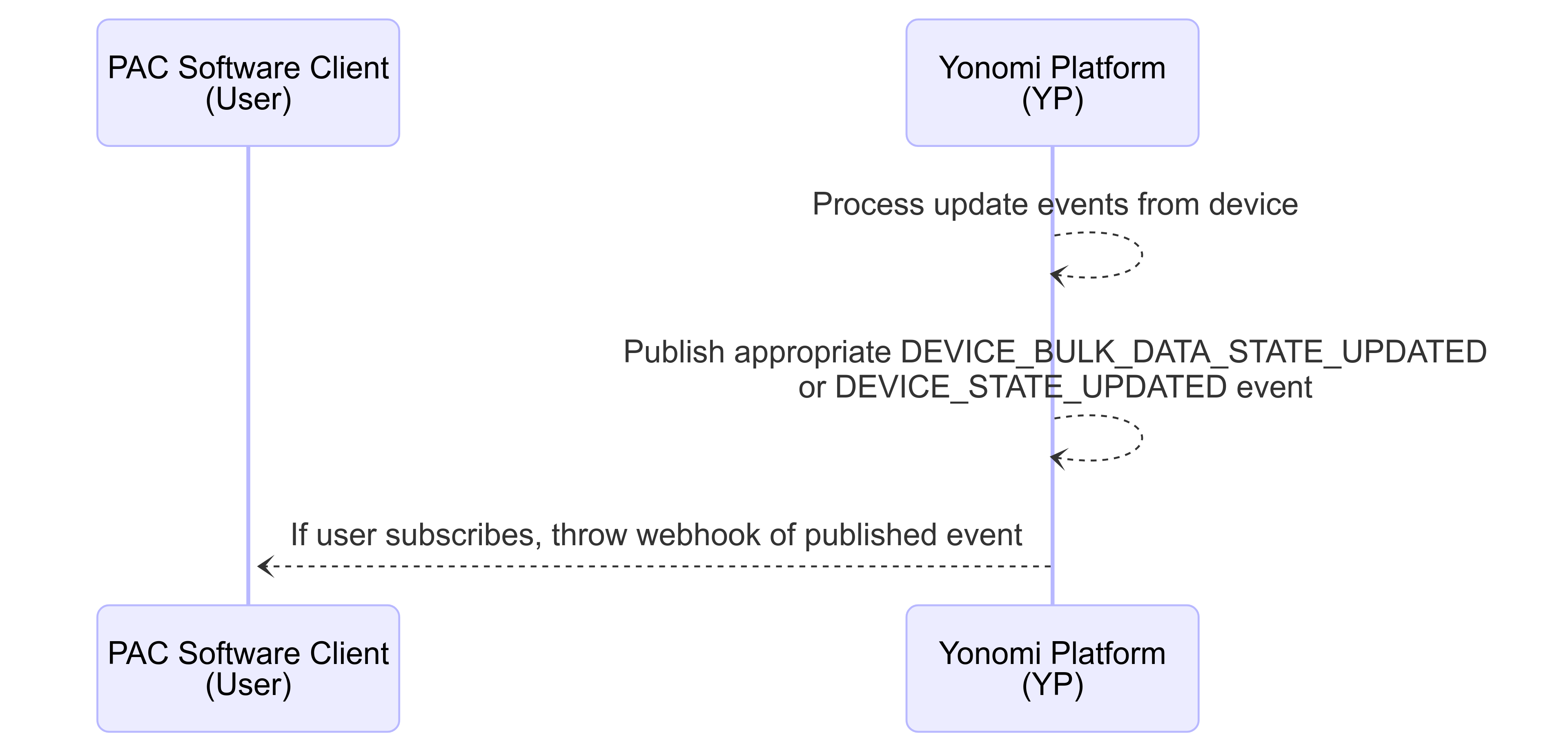
- PACs software needs to be notified / informed when device reported states are updated so that they can inform their users
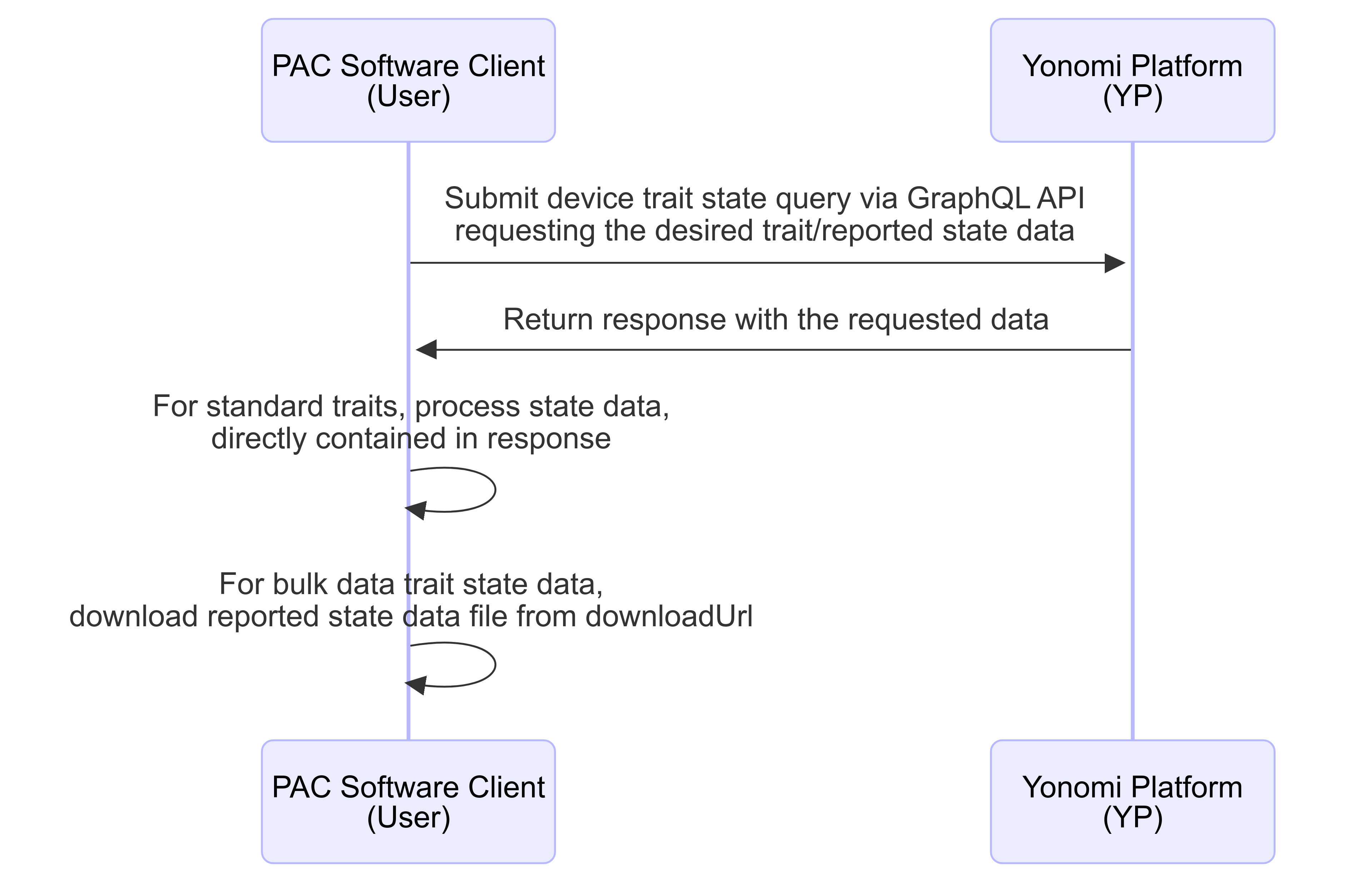
For each of these use cases, when dealing with a bulk data type trait, there may be additional steps required. These are outlined in the followning flow diagrams.
Querying Device Reported State
Ingesting State Updated Events
Reported State Query
A user may submit on-demand queries through the Yonomi Platform to get last reported device state information. To do that, a GraphQL query of the device should be submitted. This query should contain a fragment ( e.g. ... on LockV1DeviceTrait) for each individual trait and each fragment should be tailored to include the trait states the user desires state data for. See individual trait documentation for definition of the data that can be queried for each trait.
Required Headers
All device state queries require the following header be included regardless which trait / states are being queried.
FieldName | Description | Value | Required |
x-allegion-installation-Id | UUID of the installation that owns the device. Authentication will validate that bearer token has authorization to mutate against this installationId and that the requested deviceId is owned by that installation. If either fail, request will be rejected. | ID! | true |
Request Body Example
 query QueryDevice ($deviceId: ID!) {
    device (deviceId: "9a8f6104-6c50-476e-90ee-16b9a2dafc8d")
        id
        traits {
            name
            ... on LockV1DeviceTrait {
                state {
                    lockState {
                        reported {
                            value
                        }
                    }
                }
            },
            ... on AutoRelockDelaySettingsV1DeviceTrait {
                state {
                    autoRelockDelay {
                        reported {
                            value
                        }
                    }
                }
            }
        }
    }
}
Request Response Example
 {
    "data": {
        "device": {
            "id": "9a8f6104-6c50-476e-90ee-16b9a2dafc8d",
            "traits": [
                {
                    "name": "LockV1",
                    "state": {
                        "lockState": {
                            "reported": {
                                "value": "SECURED"
                            }
                        }
                    }
                },
                {
                    "name": "AutoRelockDelaySettingsV1",
                    "state": {
                        "autoRelockDelay": {
                            "reported": {
                                "value": 30
                            }
                        }
                    }
                }
            ]
        }
    }
}
See Trait Overview: Synchronous Request Errors for information on potential errors that may be returned
State Updated Events
See Device Events for information on subscribing to webhooks or submitting event queries.
State Updated Event Shape Examples
DEVICE_STATE_UPDATED Event
Event that is published when a reported state is updated for a standard type trait.
 {
    "eventType": "DEVICE_STATE_UPDATED",
    "id": "5ca466bc-2500-4d8d-a943-0d9245a13c6e",
    "createdAt": "2024-12-20T14:49:55.000Z",
    "deviceId": "9a8f6104-6c50-476e-90ee-16b9a2dafc8d",
    "installationId": "819cd607-aede-482e-9aa0-8b65d420e300",
    "traitName": "AutoRelockDelaySettingsV1",
    "states": [
        {
            "autoRelockDelay": {
                "reported": {
                    "value": 30
                }
            }
        }
    ]
}
DEVICE_BULK_DATA_STATE_UPDATED Event
Event that is published when a reported state is updated for a bulk data type trait
 {
    "eventType": "DEVICE_STATE_UPDATED",
    "id": "5ca466bc-2500-4d8d-a943-0d9245a13c6e",
    "createdAt": "2024-12-20T14:49:55.000Z",
    "deviceId": "9a8f6104-6c50-476e-90ee-16b9a2dafc8d",
    "installationId": "819cd607-aede-482e-9aa0-8b65d420e300",
    "traitName": "credentialsAndSchedulesV1",
    "states": [
        {
            "downloadUrl": {
                "reported": {
                    "value": "https://exampleDownloadUrl.com"
                }
            },
            "downloadUrlExpiresAt": {
                "reported": {
                    "value": "2024-12-21T14:49:55.000Z"
                }
            }
        }
    ]
}
Note: The above is the shape users get for this event when they subscribe and recieved via webhook. YP only maintains reported state data files for last reported state. As such when querying for event history, the states array does not apply.
Reported State Updated Event Fields
Field Name | Description | Data Type |
eventType | the name of the event | String |
id | the uuid assigned to the published event | ID |
deviceId | the uuid of the device that was updated | ID |
installationId | the uuid of the installation that has claimed the updated device | ID |
createdAt | ISO8601 format UTC timestamp when event was published to Yonomi event log | DateTime |
traitName | Name of the trait that defines the updated state(s). See individual trait documentation for available traitNames. | String |
states | Array of applicable state fields and values defined for the trait. The shape nested under this field for each individual trait matches the shape nested under the “state” object of that traits' Device State Query GQL response (see example response shape included in the Device Trait documentation. | Object Array - See Individual Trait documentation for state object shape |
On this page
- Device Reported State